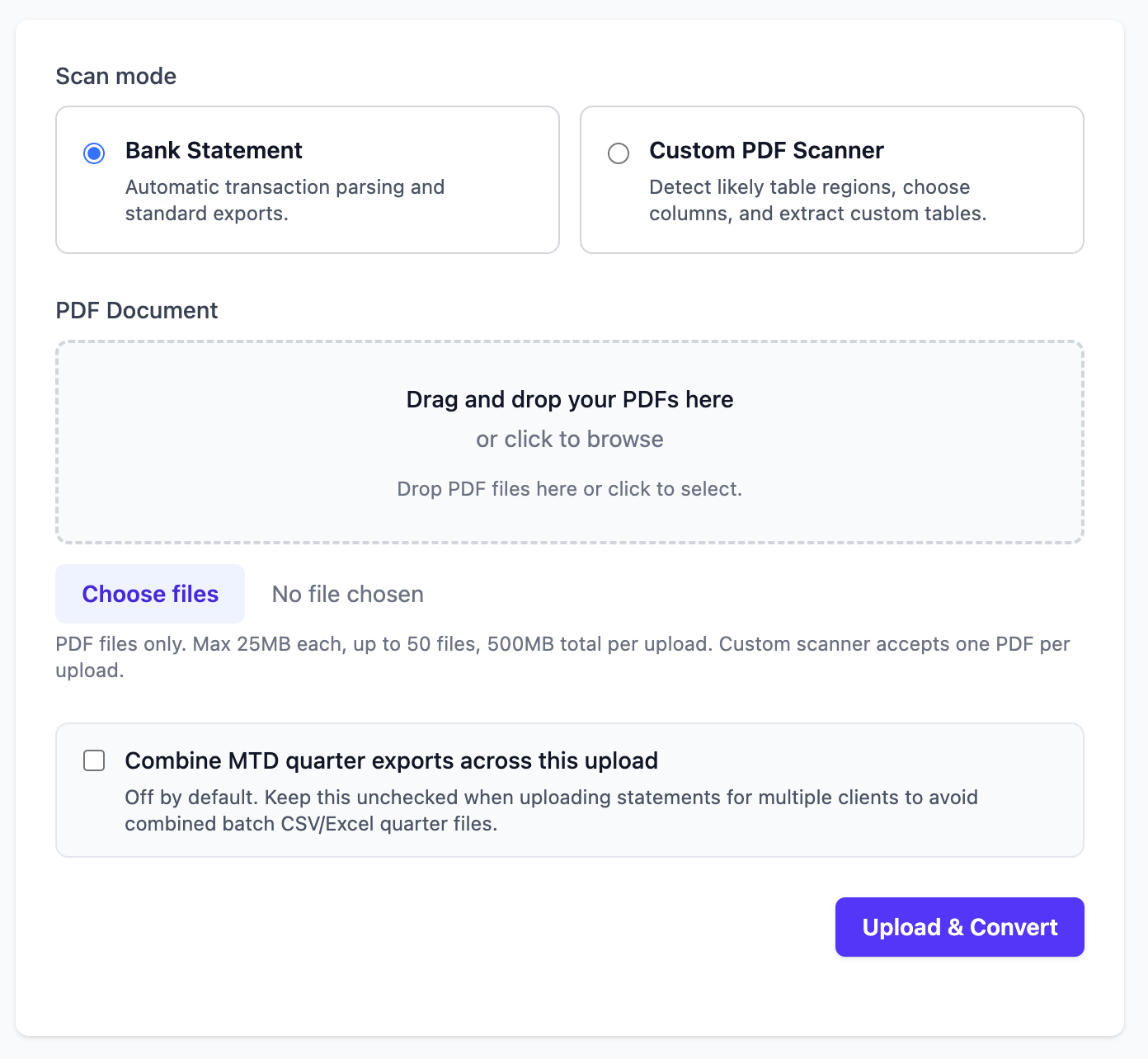
Upload mode
Bank statement and custom PDF upload screen
Users can choose bank statement mode or custom PDF scanner mode before upload.
Upload your bank statement PDFs or custom documents like purchase orders and receipts, then get clean, structured CSV or Excel files in seconds. Powered by advanced OCR technology.
Get 10 free page converts when you sign up.
Security-First Design
Built from the ground up for sensitive financial documents, with encryption, strict retention controls, and EU data residency.
Supported UK Banks
Plus many other UK banks and statement formats are supported.







A simple workflow to convert PDF bank statements to CSV or Excel.
Simply upload your bank statement PDF document.
Our AI-powered OCR extracts every transaction accurately.
Get your structured data as CSV or Excel instantly.
A quick visual preview of what you see after upload and processing.
Upload mode
Users can choose bank statement mode or custom PDF scanner mode before upload.
MTD pack view
Quarter totals with export shortcuts for accountants and MTD workflows.
| Quarter | Date Range | Transactions | Income | Expenses | Exports |
|---|---|---|---|---|---|
| MTD Q1 2024/2025 | 06/04/2024 to 05/07/2024 | 5 | £30.00 | £34.99 | CSV • Excel |
| MTD Q2 2024/2025 | 06/07/2024 to 05/10/2024 | 50 | £430.00 | £477.13 | CSV • Excel |
| MTD Q3 2025/2026 | 06/10/2025 to 05/01/2026 | 13 | £40.00 | £49.40 | CSV • Excel |
Review mode
Flags
Export mode
Available files
Below is a real example of how StatementCSV turns bank statement lines into structured, spreadsheet-ready data.
| Date | Description | Amount | Balance |
|---|---|---|---|
| 04 Mar 2026 | ACME Payroll | +1,850.00 | 3,245.18 |
| 05 Mar 2026 | Tesco Store 4521 | -76.42 | 3,168.76 |
| 06 Mar 2026 | Energy Supplier DD | -94.00 | 3,074.76 |
transactions.csv
date,transaction_type,description,paid_in,paid_out,balance
2026-03-04,credit,"ACME Payroll",1850.00,,3245.18
2026-03-05,debit,"Tesco Store 4521",,76.42,3168.76
2026-03-06,debit,"Energy Supplier DD",,94.00,3074.76
Built for teams
Invite teammates by email, move credits into a shared team balance, and keep personal and team credits separate.
Invite members quickly
Bring accountants, bookkeepers, and finance teammates into one team.
Use shared team credits
Allocate credits where they are needed and track usage in one place.
Keep balances separate
Personal and team balances stay distinct until you transfer between them.
Browse dedicated pages for common search intents and bank-specific statement conversion workflows.
Extraction Accuracy
Our OCR and parsing pipeline is tuned for UK bank statement formats to deliver highly reliable transaction extraction.
Fast
Most statements process in seconds.
Consistent
Structured CSV and Excel output every time.
Review-ready
Easy to validate before export or filing.
Security designed to meet the expectations of legal and financial firms
All files and sensitive data are encrypted at rest using AES-256. Your documents are protected even at the storage level.
All data in transit is protected with TLS 1.2 or higher. HSTS is enforced across every connection.
All infrastructure is hosted in the EU. Your data never leaves European data centres at any stage.
All documents and processed files are permanently deleted after 7 days. Every deletion is recorded in an auditable log, and deletion records can be provided on request.
Full GDPR compliance with data subject rights, minimal data collection, and Data Processing Agreements available on request.
Security controls aligned with ISO/IEC 27001:2022 across organisational, people, physical, and technological domains.
Answers to common questions about converting bank statements to CSV.
Yes. Every new account includes 10 free page converts, so you can test PDF bank statement to CSV conversion before paying.
Yes. The extraction pipeline is tuned for UK statement layouts and outputs normalized transaction data with date, description, and amount fields.
Default CSV exports include date, transaction_type, description, paid_in, paid_out, and balance.
Yes. In addition to bank statements, StatementCSV can extract structured data from custom documents such as purchase orders and receipts.
Most statements are processed in seconds. Larger multi-page files may take longer depending on page count and statement quality.
Create an account, upload a PDF, and export clean transaction data in minutes.